
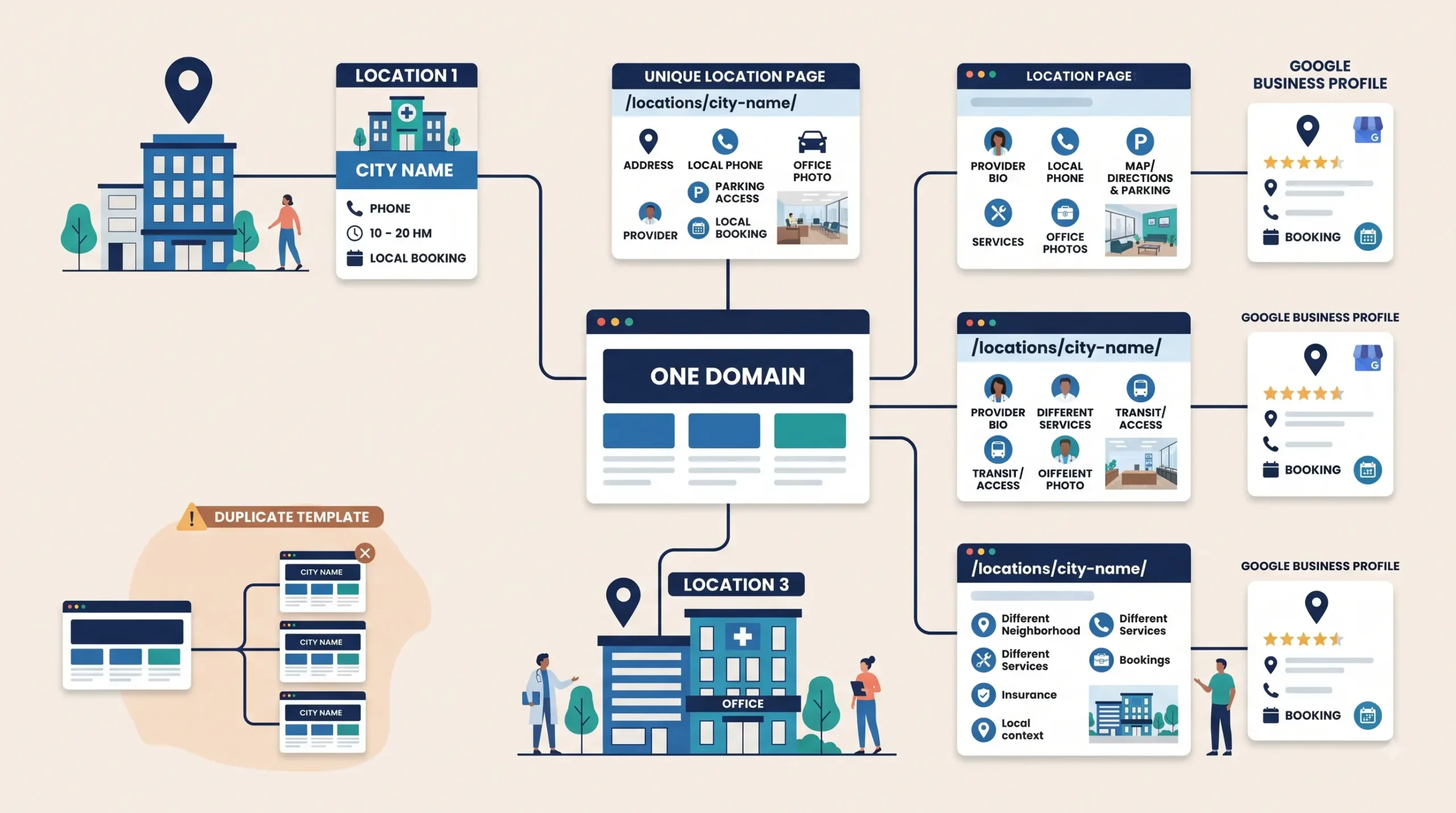
A practice opens a second office and the marketing plan is usually one line: add the new address to the contact page.
Six months later the second location has no local visibility, the original location’s rankings have softened, and nobody can explain why. The setup that worked fine for a single office does not scale, and the failure is quiet. Nothing breaks visibly. The new location simply never appears in the map pack for its own neighborhood.
Multi-location healthcare SEO comes down to three decisions: how many domains you run, how each location is represented on the site, and whether each page is a real page or a template with the city name swapped. This post covers all three, including the structure that survives adding a fourth and fifth office.
Decision one: one domain or several
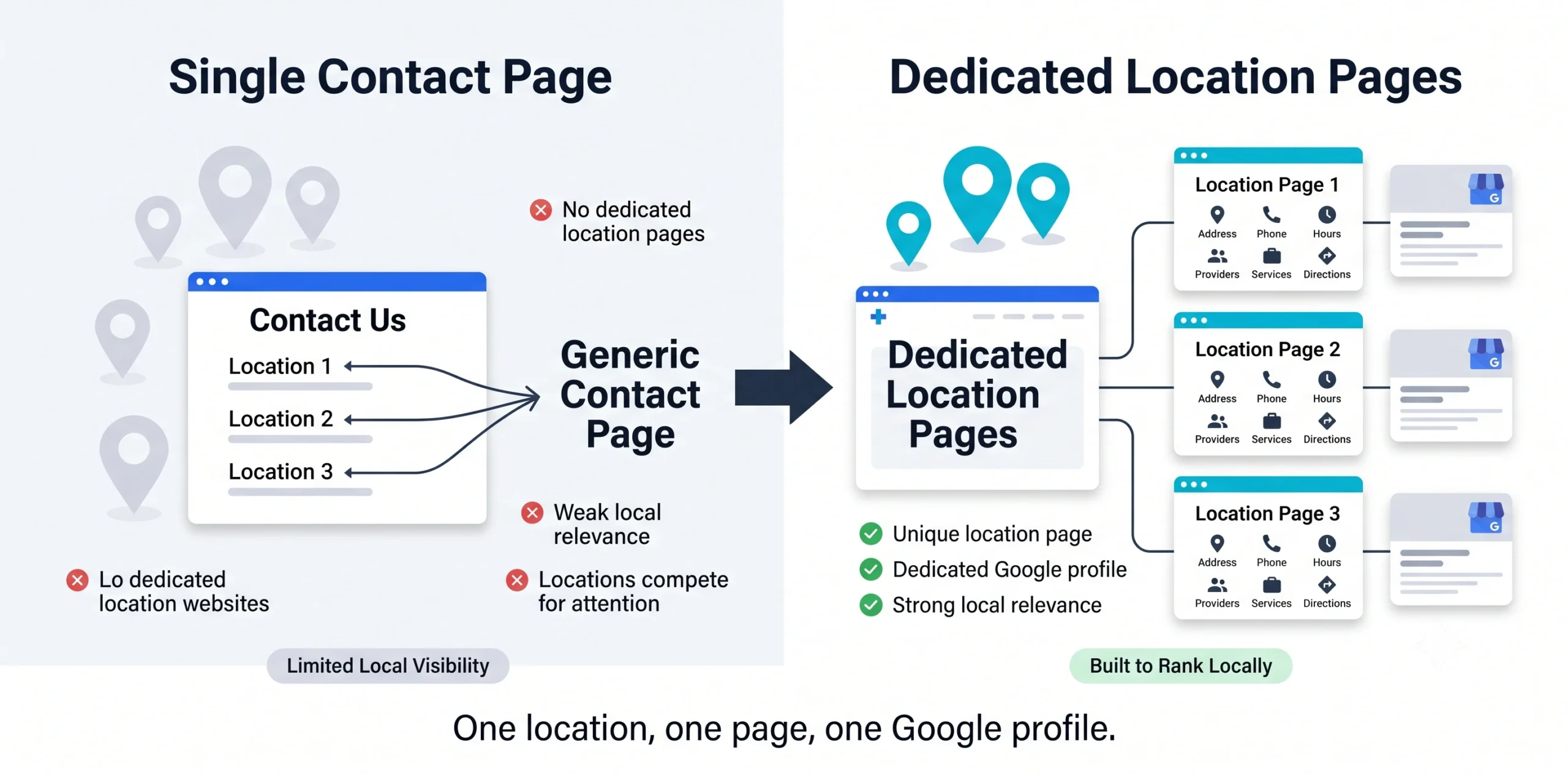
Practices with multiple offices routinely ask whether each location should get its own website. In almost every case the answer is one domain.
Why one domain wins. Authority consolidates instead of splitting. Every link, citation, and piece of content strengthens the whole practice rather than one fragment of it. Maintenance stays sane, and content produced once serves every location. Three separate sites means three sets of technical debt, three security surfaces, and three thin domains competing for the same brand terms.
The narrow exceptions. Separate domains occasionally make sense when locations operate under genuinely different brands, when a merger left established sites with real accumulated authority that would be expensive to migrate, or when locations serve entirely unrelated specialties with no shared patient base. Even then, migration onto a single domain with proper redirects is usually the better long-term move.
What people are actually worried about. The concern behind the question is usually that one site cannot rank in multiple cities. It can. Ranking in multiple cities depends on having a verified address, a complete Google Business Profile, and a substantive page for each location, not on having separate domains. We covered how those three ranking factors work in the post on [why the map pack is your real homepage].
Decision two: URL structure
Pick one pattern and hold it as you grow.
Recommended: practice.com/locations/city-name/ for the location page, with services nested underneath when a location has enough service depth to justify it, such as practice.com/locations/city-name/service-name/.
Avoid subdomains like city.practice.com. They fragment authority and add technical overhead for no ranking benefit in this scenario.
Avoid burying locations at the bottom of a contact page or inside a location picker widget that produces no crawlable URLs. If a location has no indexable page, it has no organic presence.
Include a locations index page listing all offices, linked from the main navigation. This helps crawling, and it helps patients who are deciding which office to visit.
Decision three: location pages that are not templates
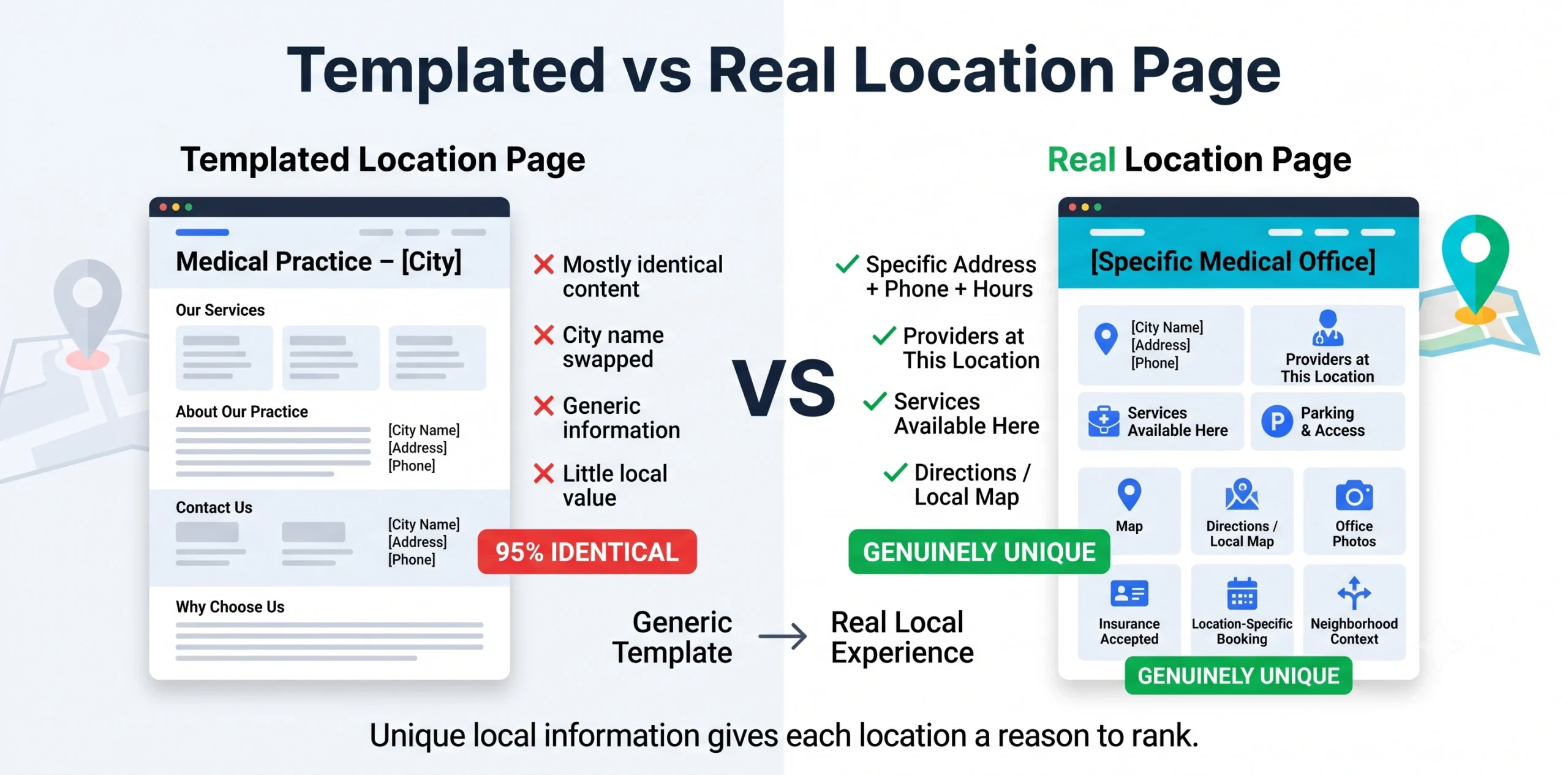
This is where most multi-location practices fail. The pattern is familiar: build one location page, duplicate it, swap the city name and the address, publish. Ten pages that are 95% identical.
Those pages rarely rank. They provide no reason for Google to treat each location as distinct, and they give patients nothing useful.
What belongs on a real location page:
- The specific address, phone number, and hours for that office. A local phone number rather than a shared central line where possible.
- Embedded map and directions, with landmark-based context for how patients actually arrive.
- Parking and access detail. Where to park, what it costs, which entrance to use, whether there is an elevator, transit stops nearby. This is the single most useful and most commonly omitted content on healthcare location pages.
- Which providers practice here, each linked to their bio page. Providers rotate between offices, so state the schedule if it varies.
- Which services are available here. Not a generic list of everything the practice does. If imaging is only at the main office, say so.
- Insurance accepted at this location, if it differs.
- Photos of this specific office. Exterior for recognition, waiting area, the actual building. Stock photos of a generic clinic defeat the purpose.
- Booking for this location, deep-linked where your system supports it.
- Genuine local context. The neighborhoods this office serves, nearby hospitals it refers to or receives from, community involvement. Not filler paragraphs about the city’s history.
What makes each page defensibly unique: the providers, the services, the access details, the photos, and the local relationships. Those differ per office in reality, so writing them accurately produces unique pages without any effort to manufacture variation.
Google Business Profiles across locations
One profile per physical location, no exceptions and no shortcuts.
Each profile needs its own verification at that address. Verification cannot be shared or transferred between locations.
Each profile links to its own location page, never to the homepage. This is a small field with real impact, and it is wrong on most multi-location profiles we audit.
Categories should reflect what happens at that office. If the second location is a satellite offering a narrower set of services, its categories should say so rather than copying the flagship.
Reviews accrue per profile. A practice with a strong main location and a new satellite will see very different review counts, and the satellite will underperform until it builds its own. Run review generation per location, not practice-wide. The compliance rules for this are covered in the guide to [asking patients for reviews without violating HIPAA]and in [how to respond to patient reviews without a HIPAA fine].
Use Google’s location groups to manage profiles under one account rather than scattering logins across office managers. Bulk management becomes necessary somewhere around five locations.
Citations at scale
Every location needs its own citation set, and this is where multi-location practices accumulate the most damage.
Each location needs consistent NAP across every directory, including healthcare-specific ones: Healthgrades, Vitals, Zocdoc, and payer directories. Insurance directories are the worst offenders because the insurer controls them and updates lag badly.
Audit for duplicates constantly. Multi-location practices generate duplicate listings faster than single-location ones, especially after a move, a rebrand, or an acquisition. An old address still listed somewhere actively competes with your current one.
Watch practitioner listings. Providers who work across multiple offices often end up with directory profiles attached to the wrong location, or to a location they left years ago.
The [local SEO audit checklist for small businesses] covers the full citation verification process, including the multi-location items.
Internal linking and site architecture
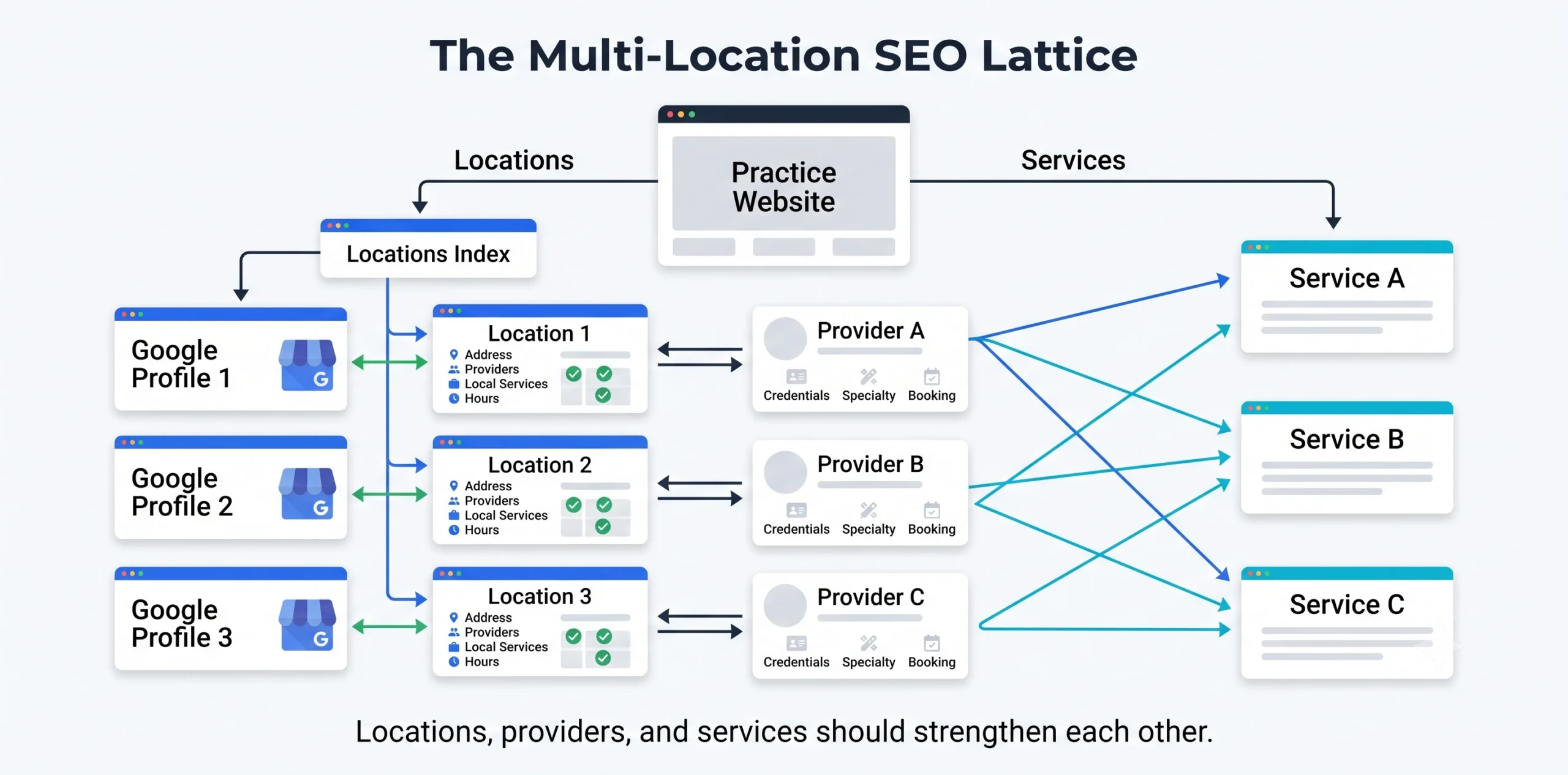
The structure that works:
- Homepage links to the locations index and to core service pages
- Locations index links to every location page
- Each location page links to the providers at that office and the services offered there
- Each provider bio links back to the locations where they practice
- Each service page links to the locations offering it
This creates a lattice rather than a hierarchy, and it distributes authority to the pages that need it. Provider bios are load-bearing in this structure, which is another reason to build them properly rather than as three-sentence placeholders. We covered what belongs on them in [physician bios are a ranking asset].
Schema. Use LocalBusiness or the appropriate medical business type on each location page with that location’s specific data, and Person schema on provider bios listing the locations where they practice.
The mistakes that cost the most
Cannibalization between location pages. Two nearby offices with pages targeting nearly identical terms compete with each other. Differentiate by the neighborhoods and specific services each actually serves.
Central phone number everywhere. A single call center number weakens local signals and makes per-location attribution impossible. Use local numbers where you can, with tracking configured to preserve NAP consistency.
Forgetting the closed location. When an office closes, mark the profile permanently closed rather than deleting it, redirect the location page appropriately, and clean the citations. Deleted profiles leave orphaned data; abandoned ones keep sending patients to a locked door.
Uneven content investment. The flagship location gets a rich page and the satellites get stubs. Satellites then never rank, and the practice concludes that location does not work in that market.
No owner per location. Someone at each office needs responsibility for hours, photos, and review responses. Centralized management without local input produces profiles that are technically complete and factually stale.
Frequently asked questions
Should each location have its own website?
Almost never. One domain with distinct location pages consolidates authority, simplifies maintenance, and ranks each location perfectly well provided each has a verified profile and a substantive page.
How do I stop location pages from being duplicate content?
Write the parts that genuinely differ: providers, services offered there, parking and access, photos of that office, and local referral relationships. If those are accurate, the pages are naturally distinct.
Can two locations in the same city both rank?
Yes, for different neighborhoods, and Google will usually show only one in a given map pack. Differentiate the pages by neighborhood and by service mix rather than targeting the same city term twice.
What happens to rankings when we move an office?
Expect a temporary drop. Update the Google Business Profile first, then every citation, then check for a duplicate listing at the old address, which is the most common lingering problem. Recovery typically takes weeks to a few months.
Do we need separate phone numbers per location?
It helps. Local numbers reinforce local signals and enable per-location attribution. If you use call tracking, keep the primary NAP number consistent across the profile and citations.
How many locations before we need management tooling?
Around five, profiles become difficult to maintain individually. Google’s location groups handle profile management; citation management tools become worthwhile at similar scale.
Should we run separate ad campaigns per location?
Yes. Separate campaigns with tight geographic targeting per office prevent budget from concentrating in one market and let you measure cost per patient by location.
The bottom line
One domain. One indexable, substantive page per location. One verified Google profile per location, linked to its own page. Citations maintained per location. Provider bios that connect the lattice together.
The practices that struggle with multiple offices are almost always running one real location page and several copies of it. The fix is not clever, it is just work that most competitors have not done either.
CGColors builds multi-location search programs for medical and dental practices, from location page architecture and profile management through per-location citation cleanup and review systems. Explore our [local SEO services] for the full scope, or the vertical pages for [mental health practices], [optometrists], and [plastic surgeons]. Every location gets found first, called first, booked first.